Snapshoting web pages in ANSI escape codes
Table of Contents
cha --dump 'nim-lang.org' | head -n12
[img]   Blog   Features   Download   Documentation    Forum   Donate   Source


  Efficient, expressive, elegant

  Nim is a statically typed compiled systems programming language. It
  combines successful concepts from mature languages like Python, Ada
  and Modula.

                   Install Nim 2.2.6       Try it online
Chawan (a super cool terminal web browser) is able to output the colors escape codes of the rendered page in dump mode!
It's easy as adding the config:
man cha-config | grep 'color-mode ' -B2 -A7
Name                      Value          Default   Function
────────────────────────────────────────────────────────────────────────────────
color-mode                “monochrome”   “auto”    Set  the color mode.  “auto”
                          /  “ansi”  /             for   automatic   detection,
                          “eight-bit”              “monochrome”  for  black  on
                          /                        white, “ansi” for ansi  col‐
                          “true-color”             ors,     “eight-bit”     for
                          / “auto”                 256-color     mode,      and
                                                   “true-color”  for  true col‐
                                                   ors.
Same example for Nim website now:
cha --dump -o display.color-mode=ansi 'nim-lang.org' | head -n12
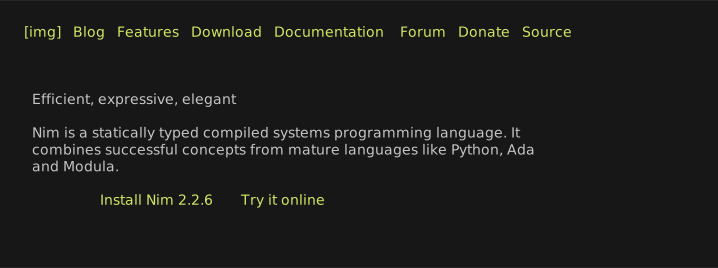
Figure 1: Results of above command converted to SVG via Charm's freeze.
Going further
In the same philosophy of termshot Bash script (see it in working in this asciicast), born now chas!
It basically commits the dumped page (with color ANSI codes) in a custom repo defined by a env, saving a JSONL entry for every page:
{
  "url": "https://nim-lang.org",
  "file": "raw/2025-12-21_23-26-25.ansi",
  "ts": 1766359585,
  "width": 130,
  "height": 43,
  "bytes": 6615
}
You can see it working in the demo asciicast of smallBashScripts repo: smallBashScripts/demos/chas.cast at master
Time to sleep
Alright, exceeded my time. Thanks for reading and hope you won't sleep late today.